

Wireless headphones are very dense in our lives, we use them on walks, at the gym, at the pool, and even at home. Wireless headphones have many advantages: portability, comfort, and the absence of extra cables. However, sometimes Bluetooth headphones can cause problems when they cannot be paired with the device. Wired headphones, on the other hand, do not require additional adjustments to get going. And that is a tangible advantage.
How to connect Sony headphones
Sony headphones can be divided into two types: Bluetooth only and Bluetooth + NFC. NFC provides more convenience when using Bluetooth headsets, but most people use only Bluetooth headsets. Still, I’ll tell you how to connect your Sony headphones in both cases, but I’ll start with the Bluetooth-only headphones.
How to connect Sony headphones via Bluetooth
Before starting to pair your headphones, I recommend that you restart the Bluetooth connection of your headphones. In this case, it will be easier to pair your Sony headphones. Now here is a quick tutorial on how to pair Sony headphones via Bluetooth:
. Turn off the Sony headphones. To check this, look at the gauges. If they are not illuminated, it means that the headphones are turned off.
. Place the headphones next to the device. It is not necessary to keep them close to the device, but a distance of about 1 meter is recommended.
. Press and hold the power button on the headphones for about 10 seconds.
. When you release the button and the headphone indicator light flashes, it means that it has entered pairing mode.
. Now take the device you want to connect your device to.
. Open the Bluetooth menu and your Sony headphones should appear among the devices available for connection.
. Select the headphones from the device list.
. Wait for your device to pair with the headphones.
. If the device requires a password (and you have not changed it), use “0000” by default.
How to connect Sony headphones via NFC
You can connect your headphones via NFC only if both the headphones and your device have the NFC function. Therefore, make sure your Sony device and headphones have NFC before using this way. To see if your Sony headphones are NFC compatible you can look at them, the models that have NFC have an N mark.
Once you are sure and everything is fine, do the following:
. Take your device and activate the NFC function.
. Bring the device to the N mark.
. Then the device will ask if you want to pair the device with the headphones, select ‘Yes.
. Congratulations, your headphones are ready to go.
Do I need to pair Sony Bluetooth headphones every time?
No, after pairing them once, you don’t have to do it again. However, you may have to repair your Sony headphones one more time in the following cases:
. If you factory reset your smartphone.
. If you have manually deleted your Sony headphones from the list of Bluetooth-connected devices.
How do I put my Sony wireless headphones into pairing mode?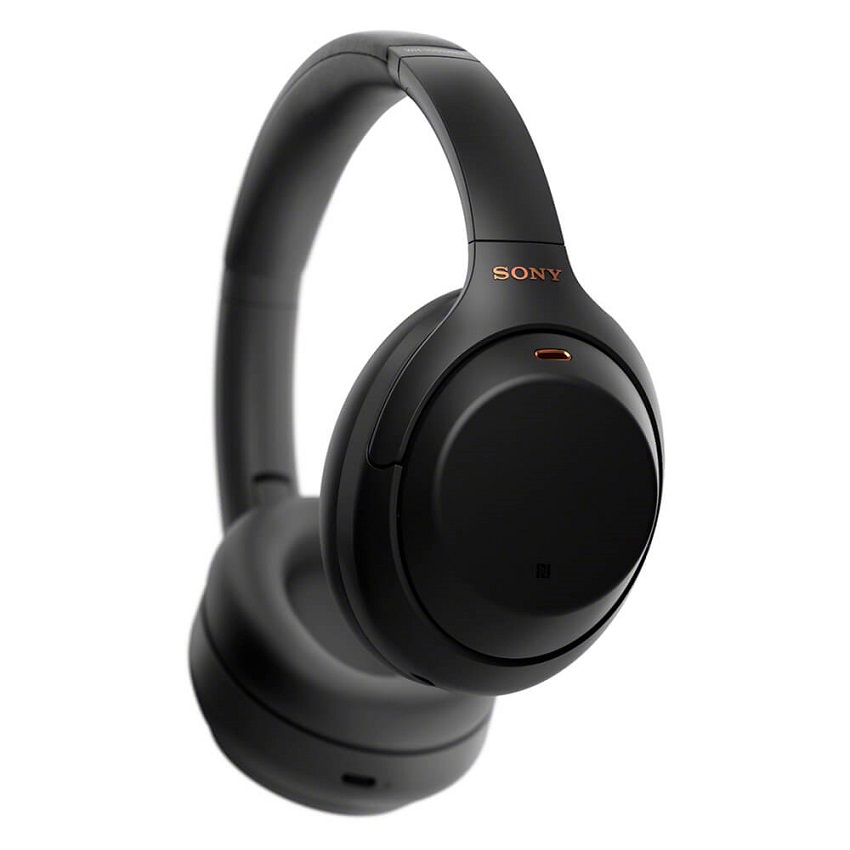
This is quite easy to do, it takes a few seconds
All you have to do is press the power button and hold it for 10 seconds until the LED starts flashing.
When this happens, it means that your Sony headphones are in pairing mode and you can connect them to any device.
Sometimes Sony headphones (some specific models) may not have a power button that can be held down. In this case, they have a slider that you need to turn on to activate the headphones. If they are not connected to any other device, you can find them in the list of available Bluetooth connections.
How to enable pairing mode on different styles of Sony headphones
There are three different styles of headphone designs produced by Sony, and all of them will have slightly different ways of activating pairing mode due to each of their designs.
The top three designs are truly wireless earbuds, bandana models, and around-the-neck earbuds.
Truly wireless headphones are a popular choice and feature the latest headphone design. They have an ultra-modern design. They do not require cables or bands and they simply fit over your ears and stay there. They are perfect for any time of the day and for whatever activity you are doing, be it for a walk, on the way to the office, or for a run. They’re great, even if you’re sitting on the couch, watching a movie, and you don’t want the noise from the TV to distract anyone.
Enabling pairing mode on truly wireless headphones is different. This is because when you take them out of the charging case, they turn on automatically. So what you need to do is put them in your ears. Then you need to touch and hold the left and right earbud sensors at the same time.
You will need to do this for about 7 seconds and then you will hear a voice in your ear saying “Bluetooth pairing”. This indicates that the headphones are in pairing mode and you can continue with the other steps to enable Bluetooth connectivity.
How can I reset my Sony headphones?
To reset your Sony headphones, just press the power button for 7-10 seconds. After that, the indicator light will start flashing, this will mean that your headphones are ready to connect to another device.
The benefits of using Sony headphones
Sony headphones are of the highest quality. They will give you one of the best audio sounds in your ear.
There are various Sony headphones that you can buy and a selection of different styles of Bluetooth headphones.
You may also like to read BEST IN-EAR MONITORS
Tags: Bluetooth, Bluetooth Headphones, Headphones, Sony, Sony Bluetooth Headphones


Leave a Reply