

You finally updated your kitchen with under-cabinet lighting, but your latest electricity bill made you wince. That warm glow is costing more than you expected. Between California’s high energy rates and the state’s push for greener homes, every watt matters. The good news? You don’t have to choose between a beautifully lit kitchen and a reasonable utility bill. Smart LED cabinet lights offer an elegant solution that slashes energy consumption while giving you total control. This guide walks you through exactly how to save energy with smart LED cabinet lights without sacrificing style or convenience.
What Makes Smart LED Cabinet Lights More Energy Efficient Than Standard LEDs?
Standard LEDs already use about 75% less energy than incandescent bulbs. Smart LEDs take efficiency further by adding intelligent controls that eliminate waste entirely. While a basic LED strip might run all evening because you forgot to flip the switch, a smart system turns itself off, dims automatically, and adapts to your actual needs.
Built-In Occupancy and Motion Sensors
Smart cabinet lights often include passive infrared (PIR) sensors that detect when someone enters the kitchen. The lights brighten as you approach and dim or turn off after a set period of no movement. This eliminates the classic “I left the under-cabinet lights on all night” mistake. In a typical household, that alone can save 30 to 50 kilowatt-hours per year.
Adaptive Brightness and Dimming Capabilities
Instead of running at full power constantly, smart LEDs adjust brightness based on ambient light levels. During the day, they may operate at 20% brightness just to eliminate shadows. At night, they provide full task lighting only when you’re cooking. This dynamic dimming reduces energy draw by up to 60% compared to always-on full brightness.
Scheduling and Automation Features
You can program your lights to follow your daily routine. Wake up to 30% brightness for coffee, then let them turn off completely once you leave for work. Evening cooking time triggers 100% brightness, but by 10 PM, the lights default to a dim night-light mode. Every unused minute of illumination directly reduces your energy bill.
How Much Energy Can You Actually Save With Smart Cabinet Lights?
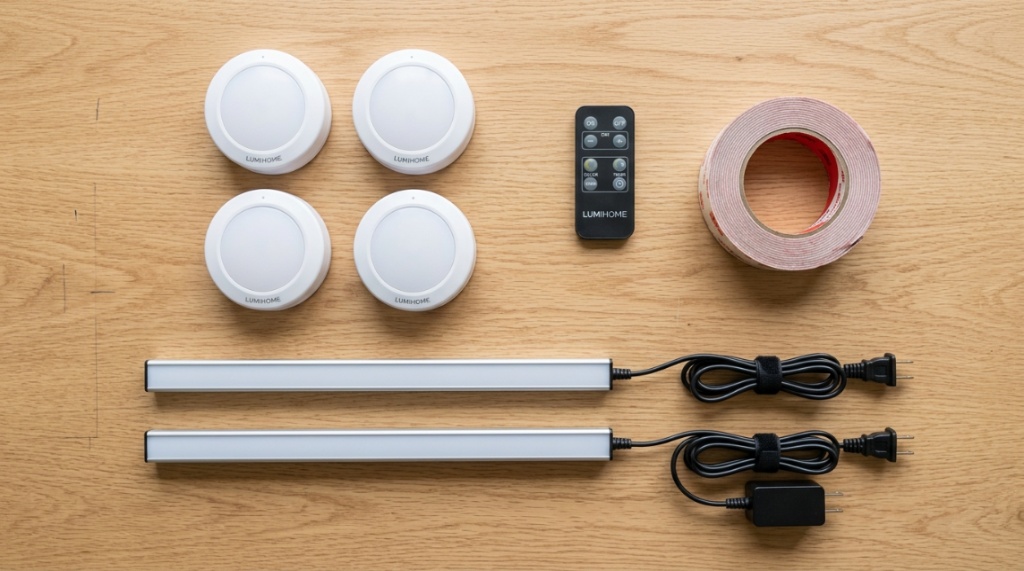
The average American kitchen has about 20 feet of under-cabinet LED strip lighting. Running standard LEDs 8 hours a day at full brightness costs roughly $35 to $50 per year in California, given the state’s average electricity rate of about 30 cents per kilowatt-hour. Switching to a smart system with automation can cut that to $12 to $18 annually.
Real-World Savings Breakdown
- Motion-activated zones: Reduce runtime by 40%–60% since lights only activate when someone is actually in the kitchen.
- Daylight harvesting: Automatic dimming based on natural light cuts energy use by an additional 15%–25%.
- Vacation and away modes: Geofencing ensures lights never run when no one is home, eliminating unnecessary consumption entirely.
- Night-mode dimming: Running lights at 10% brightness instead of 100% for 4 hours nightly saves roughly 90% of the energy during that period.
Over a 10-year lifespan, a smart LED cabinet lighting system can save a California household $300 to $500 in electricity costs alone, not including reduced bulb replacement expenses.
Why Do California Homeowners Specifically Benefit From Smart LED Cabinet Lights?
California has some of the highest residential electricity rates in the country—averaging 30.2 cents per kWh compared to the national average of 15.9 cents. That means every watt saved delivers twice the financial benefit. Additionally, California’s Title 24 energy code encourages or requires efficient lighting controls in new construction and major renovations.
Title 24 Compliance and Rebates
California’s Building Energy Efficiency Standards (Title 24) mandate that kitchen lighting must meet specific efficacy requirements and often requires controls like vacancy sensors. Smart LED cabinet lights satisfy these requirements easily. Many utility companies, including PG&E, SCE, and SDG&E, also offer rebates for installing qualifying energy-efficient lighting controls. These rebates can offset 20% to 40% of your upfront cost.
Time-of-Use Rate Optimization
California’s time-of-use (TOU) electricity plans charge higher rates during peak hours (typically 4 PM to 9 PM). Smart cabinet lights can be programmed to run at lower brightness or turn off entirely during peak periods, then provide full task lighting during off-peak hours when electricity costs less. This strategy alone can reduce your lighting-related electricity costs by 20% to 30%.
Which Smart Features Deliver the Biggest Energy Savings?
Not all smart features are created equal. Some sound impressive but barely move the needle on your energy bill. Others deliver substantial, measurable savings from day one. Understanding which features matter most helps you choose the right system and avoid paying for gimmicks that don’t save power.
Occupancy Sensors (Highest Impact)
Occupancy-based control is the single most effective energy-saving feature. Studies from the Lawrence Berkeley National Laboratory show that occupancy sensors reduce lighting energy use by 25% to 60% depending on room type and usage patterns. In kitchens, where people often enter briefly and leave, the savings are at the higher end of that range.
Daylight Harvesting (Medium Impact)
Photocell sensors that measure natural light and dim LEDs accordingly save 15% to 25% annually. This feature works best in kitchens with large windows or skylights where natural light varies throughout the day. It requires no user input and adapts automatically.
Geofencing and Away Modes (Low to Medium Impact)
Geofencing uses your smartphone’s location to turn lights off when you leave and on when you return. While the energy savings are modest (5% to 10%), it provides peace of mind and eliminates the “did I leave the lights on?” anxiety. Combined with other features, it contributes to overall efficiency.
How Do You Choose the Most Energy Efficient Smart Cabinet Light System?
Choosing wisely involves more than picking the first LED strip you find. Efficiency depends on the type of LED, the quality of the driver, the smart protocol, and the control features. A poorly designed system may claim to be smart but still waste significant energy.
Look for High Efficacy Ratings
Efficacy measures how many lumens (light output) you get per watt of electricity. For cabinet lights, look for efficacy of at least 80 lumens per watt. Premium strips often achieve 100 to 120 lm/W. Avoid anything below 60 lm/W, as those strips may be using older, less efficient LED chips. Compare specs carefully before buying.
Check the Standby Power Consumption
Smart lights draw a small amount of power even when turned off to maintain Wi-Fi or Bluetooth connectivity. This “vampire draw” can range from 0.2 watts to 1.5 watts per device. For a kitchen with multiple strips, standby power can add up to 10 to 15 kWh per year. Choose systems with standby consumption below 0.5 watts per controller.
Match the Control System to Your Lifestyle
A system that feels inconvenient to use will end up being left on all the time. If you prefer voice control, choose a system compatible with Alexa or Google Home. If you want automation, pick one with strong scheduling and sensor capabilities. The most energy-efficient system is the one you actually use consistently. For a reliable selection of high-efficiency options, check out the best energy efficient cabinet lights California homeowners trust for real savings.
Can You Retrofit Existing Cabinet Lights With Smart Controls?
Absolutely. You don’t need to rip out your current under-cabinet lighting to get smart energy savings. Several retrofit options let you add intelligence to existing LED strips or puck lights without rewiring your kitchen. This approach costs a fraction of a full replacement and can still cut energy use by 30% to 50%.
Smart Plugs and Inline Switches
If your current cabinet lights plug into a wall outlet, a smart plug with energy monitoring gives you scheduling, remote control, and usage tracking. Simply program the plug to turn off during the day and dim through the evening. Inline smart switches work similarly for hardwired lights, replacing the existing wall switch with a module that adds Wi-Fi control.
Adding Motion Sensor Modules
Standalone motion sensors can be wired between your existing light fixture and its power source. These sensors override the manual switch, turning lights on when motion is detected and off after a set delay. Installation takes about 15 minutes and costs $15 to $30 per module. It’s the cheapest way to eliminate accidental overnight lighting.
Upgrading to Smart LED Drivers
For existing LED strip installations, replacing the standard driver with a smart LED driver enables dimming, color temperature adjustment, and connectivity. This upgrade maintains your current strip and housing but adds full smart functionality. Expect to pay $40 to $80 per driver, with energy savings covering that cost within 12 to 18 months.
How to Install Smart LED Cabinet Lights Yourself
Installing smart LED cabinet lights is a beginner-friendly DIY project that takes one to two hours for a typical kitchen. You need basic tools: a tape measure, screwdriver, wire strippers, and a drill if you plan to route wires through cabinets. Most modern systems use plug-and-play connectors that eliminate soldering.
Step-by-Step Installation Guide
- Measure your cabinet lengths and choose strips that match (cuttable strips work best for custom lengths).
- Clean the underside of your cabinets with rubbing alcohol to ensure adhesive sticks properly.
- Peel the backing from the LED strip and press it firmly along the cabinet edge, keeping it parallel to the front.
- Connect the strip to the smart controller using the provided snap connectors, ensuring polarity matches.
- Plug the controller into a power outlet or wire it to a switched circuit if hardwiring.
- Download the companion app, create an account, and pair the lights by following the in-app instructions.
- Configure your schedules, sensor settings, and automation rules within the app.
Wiring Tips for a Clean Look
Hide wires by running them through the back of cabinets using cable clips. For a professional finish, drill small holes inside cabinets to route wires along the back panel. Use cable raceways painted to match your cabinets if you can’t hide wires entirely. Avoid running wires near heat sources like the stove or oven.
What Is the Best Way to Automate Your Cabinet Lights for Maximum Efficiency?
Automation transforms a smart system from convenient to genuinely energy-efficient. The goal is to have lights that only run when needed, at the lowest acceptable brightness, and never by accident. A well-configured automation schedule can reduce your lighting energy consumption by 60% to 80% compared to manual operation.
Create Activity-Based Zones
Divide your kitchen into zones: prep area, cooking zone, and sink area. Set each zone to activate only when motion is detected in that specific area. No need to light the whole kitchen just to grab a glass of water. Zone-based lighting uses 30% to 50% less energy than lighting the entire countertop at once.
Set Brightness Profiles for Different Times of Day
- Morning (6 AM – 9 AM): 40% brightness, warm white for gentle wake-up lighting.
- Daytime (9 AM – 4 PM): 20% brightness or off if natural light is sufficient.
- Evening cooking (4 PM – 8 PM): 100% brightness for detailed food prep.
- Night (8 PM – 11 PM): 30% brightness for ambient cleanup and snacking.
- Sleep (11 PM – 6 AM): 10% brightness motion-activated path lighting only.
Integrate With Other Smart Home Routines
Connect your cabinet lights to your smart thermostat or door locks. For example, when you arm your security system or set your thermostat to away mode, the kitchen lights should turn off automatically. When you unlock the front door in the evening, the cabinet lights can turn on at 20% brightness to greet you without wasting energy.
Can Smart Cabinet Lights Pay for Themselves Through Energy Savings?
Yes, and the payback period is shorter than most homeowners expect. A typical smart LED cabinet lighting system costs between $150 and $400 for a standard kitchen, including controller, strips, sensors, and installation supplies. At California electricity rates, the annual energy savings range from $25 to $50, meaning the system pays for itself in three to eight years.
Lifespan and Maintenance Savings
Smart LEDs rated for 50,000 hours last roughly 17 years at 8 hours of daily use. You won’t replace bulbs or strips during that period. Standard under-cabinet fixtures often require new bulbs every 2 to 3 years. Eliminating replacement costs adds another $50 to $100 in savings over the system’s lifetime.
Added Home Value and Curb Appeal
While not a direct energy saving, smart lighting increases your home’s resale value, especially in California’s competitive real estate market. Buyers perceive smart, energy-efficient kitchens as modern and lower-maintenance. Appraisers often assign a premium of 1% to 3% of kitchen value for upgraded lighting and controls.
Frequently Asked Questions
Can smart LED cabinet lights work during a power outage?
No, smart LEDs require power from your home’s electrical system. However, some systems have battery backup for the controller that retains your settings, so the lights return to their programmed state once power is restored. For emergency lighting, consider a dedicated battery-powered LED strip.
Do smart cabinet lights need Wi-Fi to save energy?
Not necessarily. Many smart lights use Bluetooth or Zigbee for local control and can still follow schedules and sensor inputs without an internet connection. Wi-Fi is only needed for remote control via smartphone or voice assistants. The core energy-saving features work offline.
Will smart LED cabinet lights interfere with my Wi-Fi network?
Typically no. Most smart lights use low-bandwidth protocols that place minimal demand on your network. However, if you install 20 or more smart devices in a kitchen, consider using a hub-based system (Zigbee or Z-Wave) instead of direct Wi-Fi to avoid congestion.
Are smart cabinet lights difficult to set up for a non-tech person?
Most modern systems are designed for straightforward setup. Download the app, plug in the controller, and follow guided pairing steps. If you can connect a phone to a Bluetooth speaker, you can set up smart cabinet lights. Many brands also offer customer support hotlines.
Can I use voice commands to control energy settings?
Yes, voice assistants like Alexa and Google Assistant let you say commands such as “Alexa, dim kitchen cabinet lights to 30%.” This makes it easy to adjust brightness without fumbling for switches, encouraging you to use lower energy levels more often.
Do smart cabinet lights work with solar-powered homes?
Absolutely. Smart cabinet lights are ideal for solar homes because you can schedule them to run during peak solar production hours. This lets you power your kitchen lighting entirely with renewable energy, reducing your grid draw and maximizing your solar investment.
Conclusion
Saving energy with smart LED cabinet lights comes down to three things: choosing efficient hardware, using intelligent controls, and setting up automation that matches your daily habits. Start by assessing your current setup and identifying where energy is wasted—lights left on all night, full brightness when dim would do, or whole-kitchen lighting for a single task. Then introduce smart features one step at a time, beginning with motion sensors and scheduling. Within a few months, the savings on your California electricity bill will confirm that your investment was worthwhile. Take the first step today by selecting a system that fits your kitchen and lifestyle, and let the smart controls do the work of saving energy for you.




Leave a Reply