
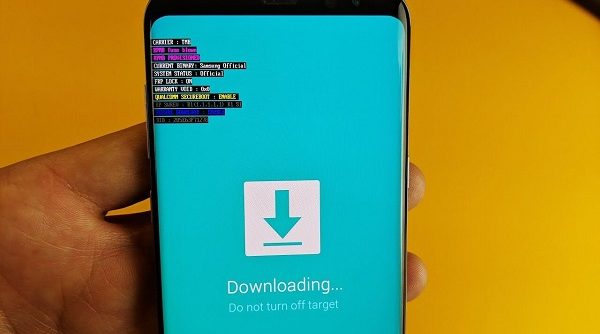
Imagine that you are using your Samsung Galaxy mobile or your Note quietly and, suddenly, the screen freezes. It turns blue or black and the Android logo appears with a message: “Downloading… Do not turn off-target”. Before you panic and think that your Android phone has passed away, don’t worry.
This is an error that frequently occurs in the Samsung Galaxy S4, S5, S6 and S7, as well as in the Note and Samsung Tablet, although it can happen in other brands and models. This is not a “deadly” bug for your device.
Today we will tell you what this message means and how you can solve it quickly and easily, as it is not something that you have to be alarmed about.
What is downloading do not turn off target?
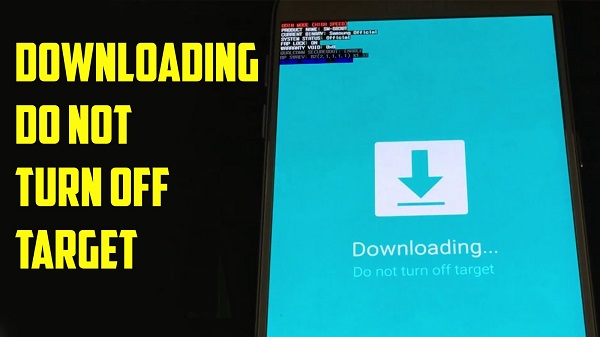
Although what it really refers to is that “the download does not find its destination.” This message usually appears when there is a problem with a ROM you have installed or when there is significant damage to your Android, in the worst case. This warning appears when the mobile is in “download mode.”
This mode is the one used to install a new OS on the smartphone or tablet or to modify something specific. If you have not started this mode manually and you still get this message, it is most likely that there is a problem. Do not worry. All Android phones, including yours, come with a factory-installed recovery mode. This modality is the one that will help you solve this problem.
How long does the frozen screen take?
This error is common when turning on the mobile. Normally, the screen lights up or the Samsung logo starts to load. However, when this error starts, it freezes and does not progress. So instead of showing the Samsung logo, the Android logo or a download logo appears with this message, accompanied by various development codes in the upper left corner. The screen will remain frozen with this error indefinitely until you apply the corresponding solution.
Fix downloading do not turn off target
Don’t worry about this error. Believe it or not, its solution is much simpler than you think. In this section, we will explain several options to exit the “downloading do not turn off target “mode.
Restart the mobile
Restarting the mobile phone is the first step. To do it while the screen is frozen, you just have to press and hold the power button for about 10 to 15 seconds. In this way, the phone will turn off its screen automatically without showing you the panel or options as it always does. Let it sit for a minute and try turning it on to see if it starts up as usual. Sometimes doing this solves the problem. If not, try the following solutions.
Exit download mode: turn off the phone and combine buttons
In this case, you have to shut down instead of restart. It is the simplest and most effective solution when it comes to solving this problem. If the normal shutdown does not work for you and your mobile has a removable battery, take it out, wait a few seconds and put it back in place. Once you’ve turned off your phone, try the following combinations — it will depend on the Samsun model you have—:
Home + Power button
All Android versions of Samsung have different combinations. One of them can help you activate a special function to avoid this problem. To do this, follow these steps:
Press the home button and the power button at the same time for about 10 to 30 seconds while the screen is frozen and wait for it to react.
The screen will unfreeze and shut down suddenly, going black.
It will start to react automatically and start as usual. If not, try the following combination.
Low Volume + Home + Power Button
Another combination that Samsung Note and Galaxy phones can have is this. Use it if the previous one doesn’t work for you. To remove the “do not turn off target”, do the following:
Press and hold these three buttons simultaneously while the screen is frozen to force their operation.
The screen will turn off and the phone will start to reboot itself.
Release the keys to restart in normal mode. If you leave them pressed, it will go to factory mode or “factory mode.”
As you can see, this problem is very easy to solve and does not represent a major danger for you or your mobile. It is important that, once you manage to unfreeze the screen, you uninstall the ROM that generated the error.
Reinstall the operating system with Odin
Didn’t the previous methods work for you and you keep seeing the message “downloading do not turn off target” without being able to do anything? If so, it is possible that the problem is in the Android operating system, so the solution will be to reinstall the OS through specialized tools, in this case, Odin.
Causes: Why am I getting this error message?
There are several reasons why this error message can appear, but there are three that are very common. Let’s look at them one by one.
First: there is a problem with some ROM that was installed incorrectly or some error occurred during its installation. When the installation of a ROM is interrupted or there is some component of the same with errors, the process will finish, but it will cause this error.
The ROM is a complete picture of our operating system. In them, all the information about it is stored, such as its applications, functions, etc. When this is not installed properly, it will obviously not show up well.
Second: this cause is also related to ROM. It is that one of the primary files is heavily damaged or modified. This can cause the operating system to not turn on properly, resulting in the error “downloading do not turn off target.”
Third: that your device is in “download mode,” and you have not noticed. This mode is accessed by pressing the Power + Volume Down + Home Button, which can happen unintentionally. If this is the cause of the error, it is the easiest to solve, as we have commented throughout this post.




Leave a Reply